> ## Documentation Index
> Fetch the complete documentation index at: https://docs.bloom.diy/llms.txt
> Use this file to discover all available pages before exploring further.
# Features
> Everything you need to build, test, and manage full-stack apps.
Bloom includes everything you need to design, build, and manage full-stack apps in one environment. Your app's frontend and backend live in the same workspace, so you can move between building, testing, and managing without switching tools.
## Core Features
Monitor queries, cache health, and performance in real time.
Track frontend and backend activity in one unified stream.
Built-in OAuth with Google, GitHub, Apple, and more.
Connect external services with auto-provisioned or custom keys.
Backend health metrics updated as your app runs.
Share your app via link or QR code—no App Store required.
## Unified Workspace
When you open an app in Bloom, you'll find everything in one place: your project files, preview, backend tools, and settings.
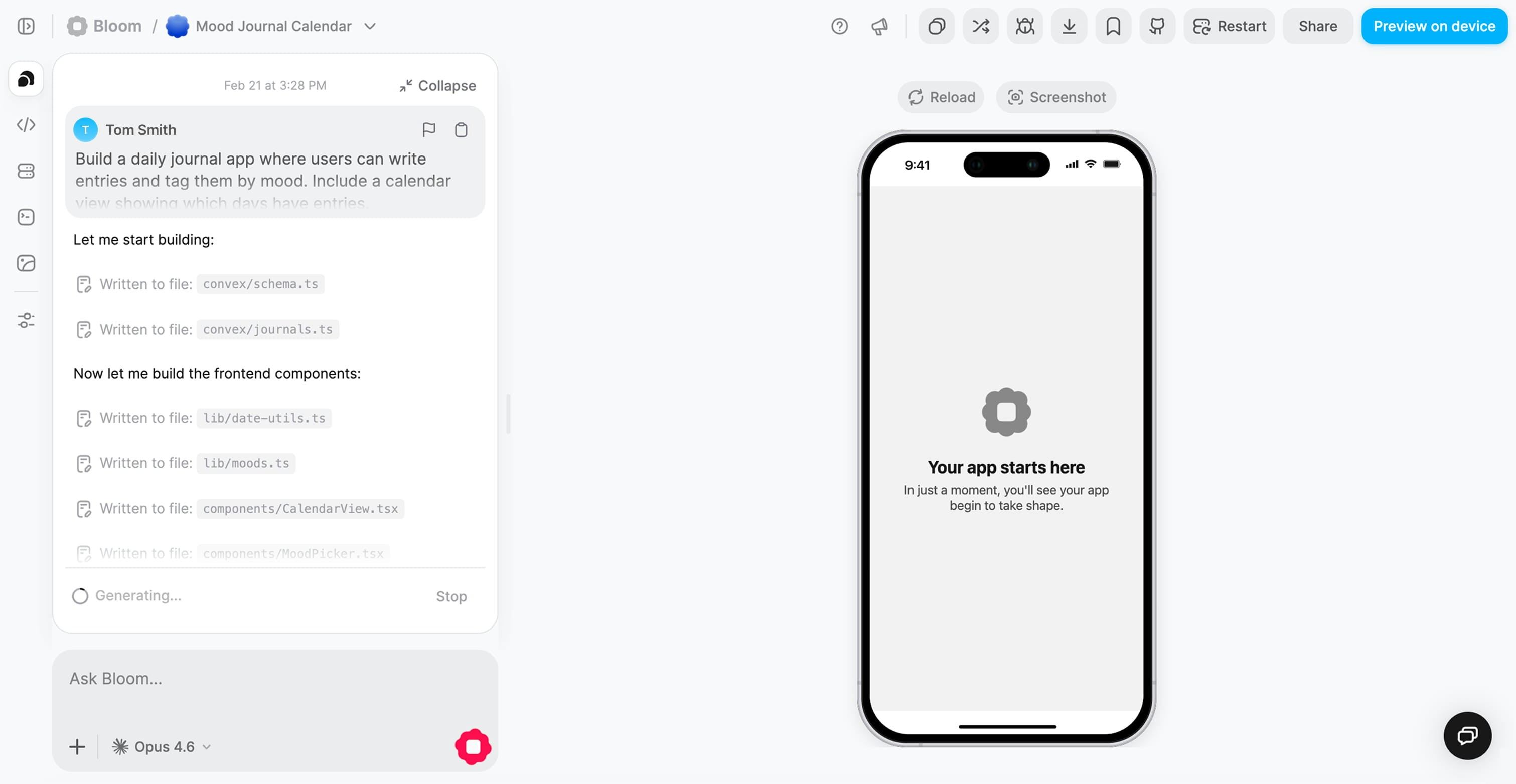 You can switch seamlessly between building, running, and monitoring your app without leaving the workspace.
### Core Views
**Explore your project structure**
Browse and understand your generated Expo + Convex codebase. See how your frontend components connect to backend functions.
**See changes instantly**
Your app runs on the right side of the screen. Every change updates in real time—no manual refresh needed.
Preview on web, iOS, and Android simultaneously
Toggle between web and mobile preview to test both layouts
Hot reload as you make changes
Test user flows without deploying
You can switch seamlessly between building, running, and monitoring your app without leaving the workspace.
### Core Views
**Explore your project structure**
Browse and understand your generated Expo + Convex codebase. See how your frontend components connect to backend functions.
**See changes instantly**
Your app runs on the right side of the screen. Every change updates in real time—no manual refresh needed.
Preview on web, iOS, and Android simultaneously
Toggle between web and mobile preview to test both layouts
Hot reload as you make changes
Test user flows without deploying
 Scan the QR code to preview your app natively on your phone while you build.
**Access all tools in one place**
The sidebar gives you quick access to:
* **Backend Dashboard** — Performance metrics and health
* **Logs** — Frontend and backend activity
* **Authentication** — OAuth provider management
* **API Connections** — External service integrations
* **Settings** — Environment variables and configuration
No context switching: everything you need to build, debug, and deploy is in the same interface.
### Why the unified workspace matters
Go from idea to working feature in minutes, not hours.
See frontend and backend issues in context, all in one view.
Start building immediately—no local environment configuration needed.
**The result:** You can go from "generate" to "test" to "deploy" without any local setup or external tools.
## What's next?
Learn how to monitor your app's performance
Debug your app with unified logging
Scan the QR code to preview your app natively on your phone while you build.
**Access all tools in one place**
The sidebar gives you quick access to:
* **Backend Dashboard** — Performance metrics and health
* **Logs** — Frontend and backend activity
* **Authentication** — OAuth provider management
* **API Connections** — External service integrations
* **Settings** — Environment variables and configuration
No context switching: everything you need to build, debug, and deploy is in the same interface.
### Why the unified workspace matters
Go from idea to working feature in minutes, not hours.
See frontend and backend issues in context, all in one view.
Start building immediately—no local environment configuration needed.
**The result:** You can go from "generate" to "test" to "deploy" without any local setup or external tools.
## What's next?
Learn how to monitor your app's performance
Debug your app with unified logging